
Your Phone is Now Reading Over Your Shoulder (And That’s a Good Thing)
Let’s be honest for a second: when was the last time you were genuinely blown away by a smartphone update?
For the past decade, we’ve been stuck in a cycle of iterative boredom. Every year, we get slightly brighter OLED screens, processors that benchmark a few percentage points higher, and camera bumps that require a thicker case. But the fundamental way we use our pocket supercomputers hasn’t changed since the original App Store launched. You unlock the screen, you tap an icon, you scroll, you close it, and you tap another icon. It’s a manual, fragmented, and honestly, exhausting way to navigate the digital world.
But this week, the era of the “App Grid” officially began its descent into obsolescence.
The much-rumored, billion-dollar mega-partnership between Apple and Google has finally borne fruit, bringing Gemini’s On-Screen Awareness directly into the veins of Siri. This isn’t just another voice assistant update that slightly improves how it sets a kitchen timer. This is the birth of the Agentic Smartphone—a device that stops making you do all the manual labor and starts acting as a true, autonomous digital employee.
If you’re wondering how your daily mobile experience is about to fundamentally shift, buckle up. We are moving from a world where we manage apps to a world where our phones manage us.
Table of Contents
- The Death of the App Grid: Welcome to the Headless UI
- What Exactly is “On-Screen Awareness”?
- The Apple-Google Mega-Partnership: A Match Made in Silicon
- Cloud vs. Local AI: The Privacy Mandate
- Will Your Current Hardware Survive the Agentic Shift?
- The “Agentic Workflow” in Daily Life: 3 Real-World Scenarios
- The Ripple Effect: What This Means for App Developers
- The Bottom Line: Are You Ready to Let Go?
1. The Death of the App Grid: Welcome to the Headless UI
To understand why this update is monumental, we have to look at how broken our current mobile workflow is. Think about planning a simple dinner with a friend.
Currently, your friend texts you a restaurant name. You copy the text. You open Google Maps to paste it and check the distance. You realize you need a ride, so you open Uber to check prices. Then, you open your Calendar app to block out the time. Finally, you jump back to your messaging app to confirm. You acted as the human “glue” connecting four completely separate software silos.
The tech industry calls this the “App Grid” problem. You are the processor.
The Siri Gemini integration introduces what is being called a “Headless UI.” In this new paradigm, the boundaries between individual apps dissolve. You don’t need to open five different applications because the AI agent sits a layer above them. It understands your intent, interacts with the apps in the background, and simply presents you with the final result. The apps still exist, but you rarely have to look at their interfaces ever again.
2. What Exactly is “On-Screen Awareness”?
The magic trick making this Headless UI possible is a feature called On-Screen Awareness.
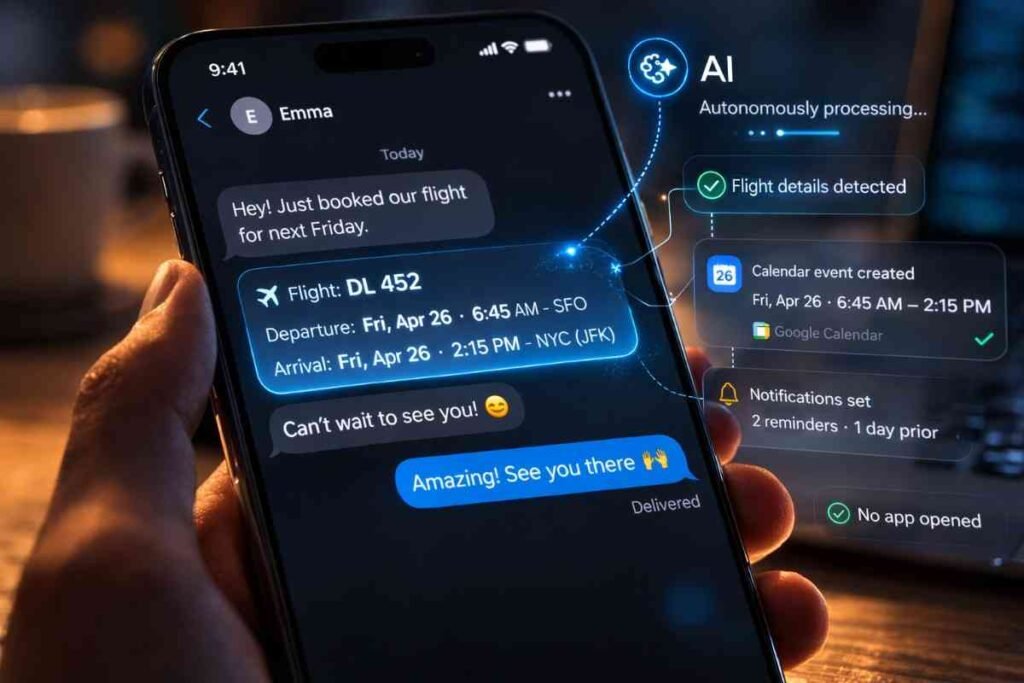
Until now, AI assistants were blind. When you talked to them, they only knew what you said, not what you were looking at. If you were looking at a flight itinerary in your email and asked your assistant to “add this to my calendar,” it would get confused. It didn’t know what “this” was.
With On-Screen Awareness, the AI is essentially reading over your shoulder (with your permission, of course). It leverages advanced multimodal computer vision to “read” the pixels on your screen in real-time.
If you receive a WhatsApp message from your boss saying, “Let’s move the Friday sync to 2 PM and include the Q3 marketing PDF,” you simply trigger your agent and say, “Take care of that.” The AI instantly reads the text message, recognizes the date and time change, identifies the specific PDF mentioned based on your recent files, opens your calendar in the background, updates the invite, attaches the file, and drafts a confirmation reply. All you have to do is hit “Approve.” It’s transforming the smartphone from a tool you manually operate into a proactive assistant that anticipates the next logical step in your workflow.
3. The Apple-Google Mega-Partnership: A Match Made in Silicon
You might be wondering: Why did Apple, a company famous for its walled garden, partner with its biggest rival to pull this off?
The answer comes down to the sheer complexity of reasoning models in 2026. Apple has spent years perfecting hardware and user experience, but their in-house AI, while highly secure, historically lacked the deep, contextual reasoning and generative power of models like Google’s Gemini.
Google, on the other hand, had the “brain” but needed a massive, premium hardware base to scale its agentic ecosystem past the Android border.
The Siri Gemini integration is the ultimate tech symbiosis. Apple gets to offer its users the smartest, most capable on-screen agent in the world, preventing a mass exodus to AI-first hardware. Google gets its AI embedded into the daily lives of hundreds of millions of iPhone users, cementing Gemini as the default “digital nervous system” of the 2020s. It’s a rare moment where corporate competition took a backseat to delivering an undeniably superior consumer experience.
4. Cloud vs. Local AI: The Privacy Mandate
Naturally, the idea of an AI “reading” everything on your screen sounds like a privacy nightmare. If you are looking at your bank statement, a private medical email, or a confidential business contract, the last thing you want is for a snapshot of that data to be sent to a server farm.
This is where the hardware evolution of 2026 saves the day. The Siri-Gemini integration relies heavily on Local AI (also known as Edge AI).
Instead of beaming your screen’s contents to the cloud, the “thinking” happens entirely on your device’s internal Neural Processing Unit (NPU). The agent uses smaller, highly optimized models to understand the context of your screen right there in your hand. The data never leaves your phone. It only connects to the cloud if you ask it a vast knowledge-based question, but for personal, on-screen tasks, your device acts as a closed-loop vault.
5. Will Your Current Hardware Survive the Agentic Shift?
A major concern among consumers is whether they need to drop a small fortune on a brand-new device just to experience these agentic workflows.
The short answer is: probably not. While the tech giants love to sell new hardware, the push for quantized, efficient AI models means that many modern devices are surprisingly future-proofed. The key bottleneck for on-device AI isn’t usually the processor speed; it’s the RAM (Random Access Memory). AI models need a lot of fast memory to hold their “weights” while they process your screen.
If you happen to be rocking a solid device with 12GB of RAM and 256GB of storage—like a Motorola G54, for example—you’re already holding a machine with enough memory bandwidth to handle these localized AI tasks. The industry has been quietly padding the specs of solid mid-range and premium phones for the last two years specifically to prepare for this moment. As long as your device has a dedicated neural engine and ample RAM, you will get a front-row seat to the agentic revolution without needing to upgrade immediately.
6. The “Agentic Workflow” in Daily Life: 3 Real-World Scenarios
To truly grasp how On-Screen Awareness changes things, let’s look at three ways it rewrites your daily routine:
- The Morning Commute: You’re reading an article about a new coffee shop opening up across town. Instead of opening a new tab, searching the name, finding the address, and sending it to your partner, you simply say, “Add this place to my ‘Must Visit’ list and text it to Sarah.” The AI extracts the restaurant’s name and address from the article, updates your notes database, and sends the text. Three apps used, zero icons tapped.
- The Financial Fast-Track: You receive an email with your monthly utility bill PDF attached. You trigger the agent and say, “Log this in my budget spreadsheet and set up a reminder to pay it on the 14th.” The AI reads the PDF, extracts the total amount and due date, quietly updates your budget tracker, and adds a high-priority task to your calendar.
- The Creative Hustle: You are looking at a photo you took of a street sign, but the lighting is terrible and the text is unreadable. Using local image models, you ask the agent to “Fix the lighting and make the text perfectly readable.” The on-device AI seamlessly enhances the photo and reconstructs the text natively, saving you from opening a clunky third-party photo editor.

7. The Ripple Effect: What This Means for App Developers
If users are no longer opening apps, what happens to the app developers?
We are entering the era of AIO (AI Optimization). Just as websites spent the last twenty years doing SEO to rank higher on Google, app developers now have to optimize their software to be easily readable and usable by AI agents.
If you build a travel booking app, you no longer care if the user likes your button colors or your menu layout. You only care if the user’s Siri/Gemini agent can easily interface with your app’s code to book a flight in the background. Apps will transition from being visual destinations for humans to being invisible “services” for AI agents. The user interface will become secondary to the application programming interface.
8. The Bottom Line: Are You Ready to Let Go?
The Siri Gemini integration and the rise of On-Screen Awareness represent the biggest leap in consumer technology since the multi-touch screen.
For the first time, our phones are no longer just glass tools we have to micromanage. They are becoming proactive partners. The transition might feel a bit jarring at first—letting an AI silently navigate your apps and manage your schedule requires a massive leap of trust. But once you experience the sheer frictionlessness of a Headless UI, clicking through grids of apps is going to feel as outdated as dialing a rotary phone.
2026 is the year your phone finally stops making you work for it, and starts working for you.
Frequently Asked Questions (FAQ)
What is On-Screen Awareness?
On-Screen Awareness is an advanced AI capability that allows a digital assistant to visually “read” and understand the text, images, and context currently displayed on your device’s screen, enabling it to execute commands based on that specific information.
Will the Siri and Gemini integration compromise my privacy?
No, the integration is designed with privacy as a priority. It relies heavily on Local AI (Edge computing), meaning the processing of your screen’s content happens directly on your device’s Neural Processing Unit rather than being uploaded to external cloud servers.
Do I need to buy a new smartphone to use Agentic AI features?
Not necessarily. While newer processors are faster, the primary requirement for on-device AI is sufficient RAM. Devices equipped with 12GB of RAM or more are generally well-positioned to handle these local AI tasks without requiring an immediate hardware upgrade.
How does a Headless UI change the way I use apps?
A Headless UI allows you to accomplish tasks without manually opening and navigating through multiple applications. The AI agent acts as a middleman, understanding your request and interacting with the apps in the background to deliver the final result.